Version 0.8.2 · GPLv3

LNGPATH

The whole station, in one native window.

Longpath carries Thetis forward in C++20 and Qt6 — panadapter on the graphics card, a full RX and TX chain, PureSignal, TCI and spots. Three platforms, built together and signed together.

Version0.8.2
ProtocolsP1 + P2
Bandwidth1 536 kHz
DSPWDSP
Packages5

From the antenna to the headphones

One path through the station — and Longpath owns all of it.

01 — RF on

Discovery that actually finds the radio

One state machine: Disconnected → Scanning → Connecting → Connected. Unicast discovery reaches radios through WireGuard, ZeroTier and Tailscale tunnels too, not just on the local broadcast segment. Sixteen models, sorted by chip family.

Saved per MACAuto-connectBoard capabilities
02 — Spectrum

Panadapter on the graphics card

QRhi over Metal, Vulkan and D3D12, with the full Thetis display surface behind it — spectrum, waterfall, grid and scales, saved per band across all fourteen bands. Clarity tracks the noise floor and keeps the picture readable while the band underneath moves. Nine layouts for multiple panadapters side by side, each one detachable into its own window on a second screen.

Clarity paletteNoise-floor EWMA9 layoutsZoom persists
03 — Receive

Ten WDSP sections, all reachable

Advanced AGC, EMNR, SNB, APF, triple noise blanker, NB2, binaural, RIT and XIT — each wired through to WDSP and remembered per receiver, per band. The automatic AGC threshold rides the noise floor with a MOX lockout, and the attenuator catches ADC overload before you hear it.

EMNR / NR2Adaptive attenuation31 instruments
04 — Transmit

SSB out, PureSignal on

The full transmit chain — ten-band EQ, leveler, ALC, CFC, CPDR, CESSB and phase rotator — with 21 microphone profiles carried over unchanged. PureSignal linearises the whole ANAN line plus Hermes and HL2, with two-tone IMD shown right over the spectrum, where you can actually watch it lock in.

PureSignalTwo-tone IMDDEXP / VOX
05 — The desk

Everything that used to be its own program

A TCI v2.0 server serves WSJT-X, JTDX, N1MM and Log4OM without a virtual cable. Seven spot sources — cluster, RBN, WSJT-X, DXLab, POTA, FreeDV Reporter, PSK Reporter — land stacked on the panadapter, clickable to tune. RADE is a real mode, transmit as well as receive. Amplifiers and tuners are wired in too — 4O3A and RF-Kit, plus SPE Expert, Elecraft KPA500 and the ACOM S series.

TCI v2.0Spot hubRADEVAX audio

What else is on the desk

Everything that would otherwise need a second program open.

Panadapter

Multiple panadapters instead of one

Nine layouts to choose from, from a single view to a four-way grid — and whatever the connected radio can't carry simply isn't offered, with a line underneath saying why. Any view can be detached onto a second screen. Up to five receive branches run side by side, each with its own tag, frequency and mode shown in the view; only one ever transmits, and a dedicated lockout enforces that.

9 layouts5 branchesDetachable
Transmit audio

A channel strip in front of the radio

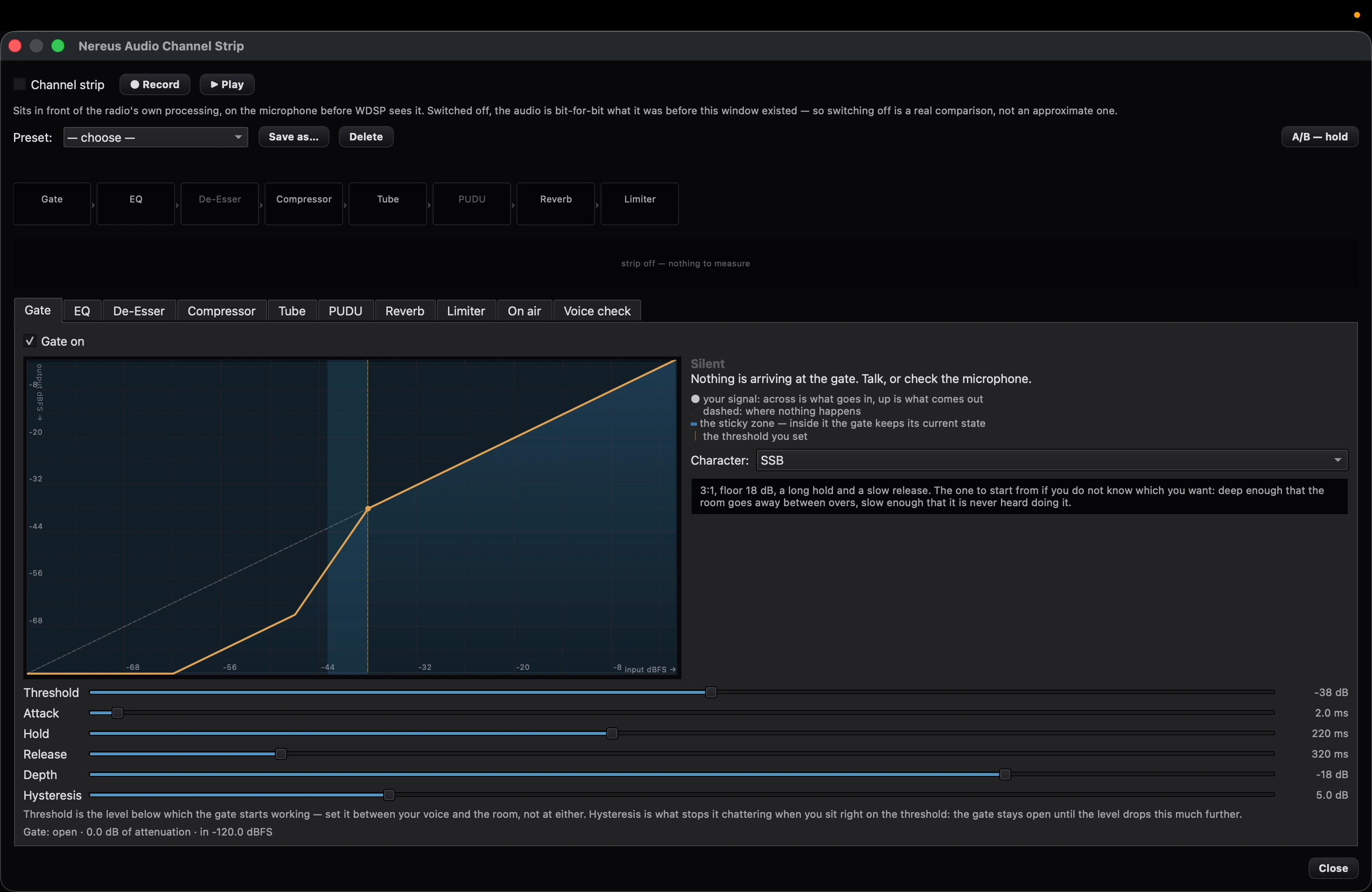
Gate, equalizer, de-esser, compressor, tube, PUDU, reverb and limiter, in signal order — at the microphone, before WDSP ever sees it. Switched off, the audio is bit-for-bit what it was before, so the comparison is real, not approximate. Plus Voice Check: record, run the chain over it offline, listen back — the radio never keys during any of it.

8 stagesA/B while holdingVoice Check
Logbook

Contacts you can actually find again

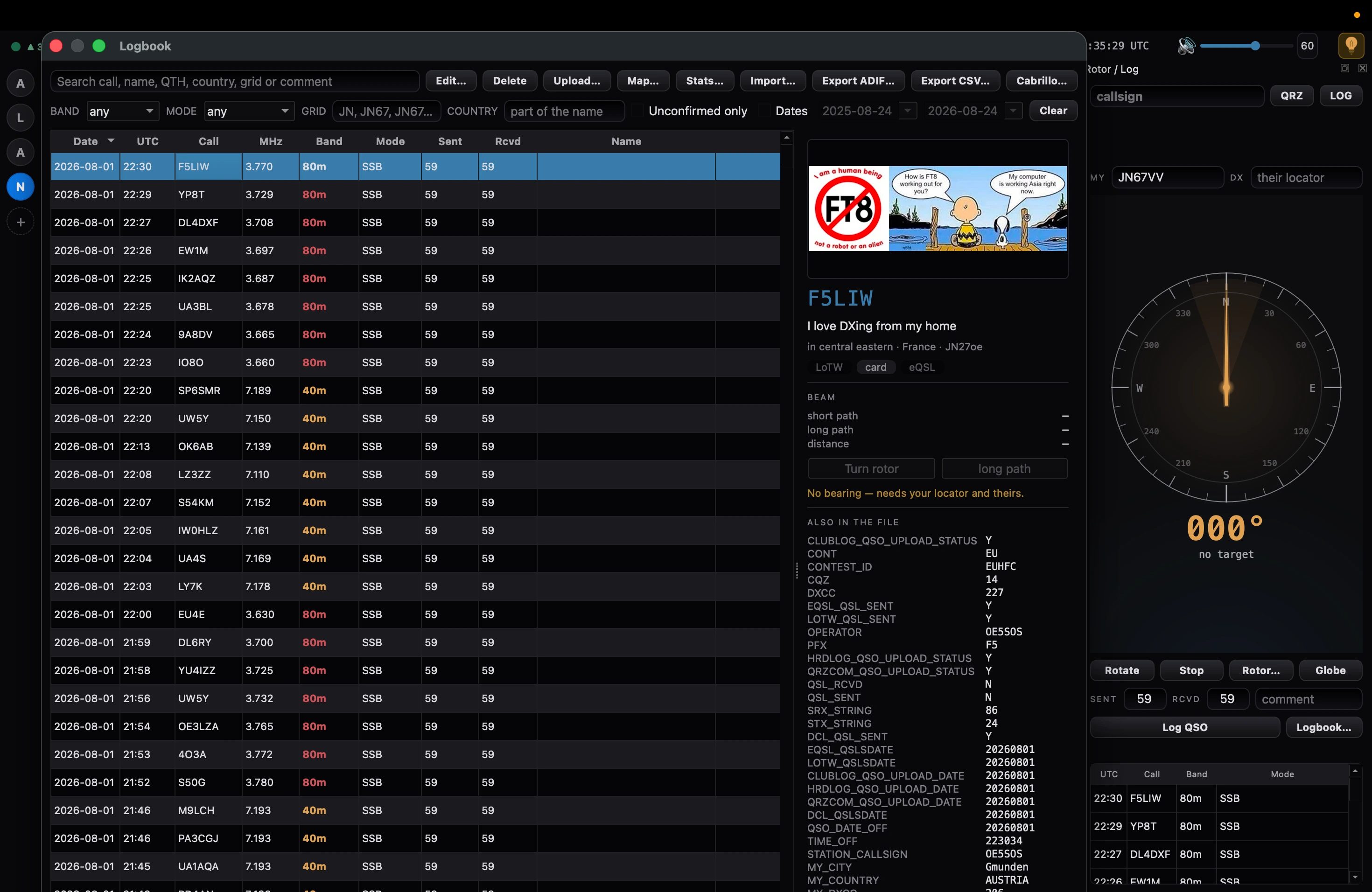
The narrow strip becomes a full workspace: search by callsign, name, QTH, country, grid or remark, filter by band and mode, ADIF and Cabrillo in and out. Alongside it, QRZ master data and the bearing there. "Sync QRZ" fetches your own QRZ logbook and merges it like an import. Behind "Stats…", six tiles: bands, modes, activity, countries, plus DXCC, WAS, grids and zones.

ADIFCabrilloSync QRZDXCC / WAS
Map

The map flies to the station

Type a callsign, press Enter — the map flies to where QRZ places the station, draws the great circle from your own location and gives distance and bearing. Underneath, NASA GIBS imagery, no key needed. Amateur satellites above the horizon appear as triangles on globe and map, and every logged QSO records which ones were in view at the time.

Great circleNASA GIBSSatellites
Antenna

The rotor learns your directions

Four presets under the compass row: right-click remembers the current bearing, left-click drives back to it. Plus park and long path. From the spot menu on the panadapter: "Turn rotor to this callsign."

4 presetsParkLong path
Diversity

Two antennas, one radiation pattern

Phase and gain as a polar plot that moves as you turn it — you see the lobe instead of guessing it. Eight memory slots per band, click to recall, right-click to store.

Radar8 slots per band
Overview

The whole band, not just the slice

On Protocol 2 the full converter range comes in as a second data stream and runs through its own FFT. A click near the edge moves the receiver there; a click in the middle only tunes.

16,384 pointsClick to move
Foreign radios

Even what doesn't speak OpenHPSDR

The SunSDR2 QRP over TCI, and public KiwiSDR receivers from the directory. Both sit behind the same safety lockout: a receiver attached to a real transmitter is never touched from there.

SunSDR2 QRPKiwiSDR
Digital

RTTY straight from the receive audio

A decoder of its own for Baudot, no WSJT-X or fldigi in between. Mark and space levels, lock and SNR visible; baud rate, polarity and sensitivity adjustable; mark and shift follow the control on the VFO. Since 0.7.0 the transmitting counterpart is in place: Baudot/ITA2 out, mark 2295 Hz, shift 170 Hz, 45.45 baud, verified as a round trip — what the transmitter writes, its own decoder reads back. Since 0.8.0 a button leads there too: mark and shift come from the slice, the baud rate from the selector, and if the band plan says no the attempt stops at once and names the reason — one press, one transmission, no CQ loop. Calls heard land on the panadapter as well, read from the word DE and the field behind it alone, so no false spot ends up there. PSK31 deliberately stays with the programs that do it.

BaudotDIGL onlyMark / shift
Digital

Morse straight from the receive audio

A CW decoder of its own, again without fldigi. It finds pitch and speed by itself, and both can be locked; the search band follows the CW pitch, which can now be set anywhere from 200 to 2250 Hz — filters and APF move with it live. Uncertain characters appear dimmed, noise is not shown at all.

CWL / CWULOCK Hz / WPM
Memories

Frequencies and receive settings under a name

Frequency memories in Thetis' format — an existing memory.xml can simply be copied in — with group, name, mode, filter, AGC and repeater offset per slot. Separately, RX profiles: a slice's AGC, noise reduction, notch, noise blanker and squelch, saved and recalled with one click.

memory.xmlQuick SaveRX profiles
Remote

Longpath on the phone

Longpath serves a page of its own that the phone opens in its browser: spectrum and waterfall, tuning by tap and drag, audio at 12 kHz mono. Pairing takes a short code, and an icon goes onto the home screen. The page finds the computer by its name, over IPv6 too. Remote access needs a token, and transmitting from the network is locked out by default.

Over TCIPairing codeTransmit locked
Remote

The phone says when nothing is coming in

When the station transmits, it now says so where the locked transmit key otherwise sits: “station transmitting · receiver muted”, in brass rather than red — transmitting is a state, not a warning. And when less than 15 dB lies between the noise floor and the strongest point, the footer reads “only noise — antenna?” instead of the data rate: measured, an occupied band gave close to 30 to 40 dB, an open input 7 to 10. During transmit the hint stays away, because the receiver is muted anyway.

Station transmittingNoise hint15 dB
Remote

Logging from the phone

A LOG button in the header opens a narrow sheet: callsign, RST both ways prefilled with 59/59 — frequency, band, mode and time Longpath takes from the slice being listened to, so the phone only sends what it actually knows there. The phone does not write the file; Longpath does, through the same one place as at the desk: one file, one writer. Append only — corrections and deletions happen at the desk. A token is required, and the switch for it is on by default.

Own TCI command59/59 prefilledAppend only
Foreign radios

The QRP now reports overload

Protocol 1 and 2 get a status bit from the radio; the QRP sends none — so Longpath finds the clipping in the I/Q itself, and does so before the profile's gain, so the threshold doesn't move with it. Eight samples at full scale out of two hundred trigger it, a single one does not, and it is reported at most twice a second; counter-measured on the radio on 80, 40 and 20 m, with no false alarm. The driver also counts the sequence numbers now and re-sends a control frame the radio did not acknowledge — a lost frequency used to go unnoticed.

From the I/QVerified on hardwareAcknowledgements
Transmit audio

A workbench for your own voice

Speak for fifteen seconds — the measurement sheet reports pitch, loudness to BS.1770, noise margin, sibilance frequency, reverberation, pops and where the microphone rolls off, and every line names something to do rather than a button: closer to the microphone, a pop filter, a curtain. Monitoring runs over the sound card and never touches the radio, optionally through one of the four transmit channels from 200–2500 to 50–4050 Hz. The overview tab shows the long-term spectrum before and after the chain, with the difference between them — measured, not assumed. New in the chain: denoising with rnnoise, the same network that runs as NR3 on receive, and a twice-oversampled clipper ahead of the limiter. Two insert slots take Audio Units on the Mac, each in a window of its own. A chain set by hand can be stored under the name of a bandwidth; deriving chains is deliberately not what this window does.

Measurement sheetMonitoring4 TX channelsAudio Units
Receive

An equalizer for the receive audio

WDSP's receive equalizer had been running all along — flat, and reachable by nobody: not one of its calls was ever declared. Now it sits in the applet panel that used to be a dummy: ten sliders from −10 to +10 dB and a switch between the receive and the transmit curve. Two presets, both documented — "Flat" is WDSP's own default, "Speech" the curve from WDSP's source; invented curves are not on offer here. It is stored per receive branch rather than per band, so the sound doesn't jump when you change band.

10 bandsRX / TXPer branch
Remote control

Other programs drive the radio

Setup > CAT & Network > TCP/IP CAT is no longer a dummy: a rigctld server on port 4532 — the radio entry "Hamlib NET rigctl" in N1MM, DXLog and WSJT-X — and next to it Kenwood CAT on port 13013 as in Thetis, so programs already set up there find their way in unchanged — including the ZZ set from Thetis, which lets N1MM+ and DXLab Commander attach directly. Frequency, mode with passband, VFO, PTT, lock, S-meter and the fine tuning are served; anything we don't know is refused rather than invented. Transmitting is locked out by default, with its own switch per bridge: a program may read and tune, but not key — unkeying always works. Verified not against assumptions but against hamlib's real TS-2000 driver.

rigctld 4532Kenwood CAT 13013Transmit locked
Transmit audio

Reading in Thetis profiles

A profile file exported from Thetis — or the whole Thetis database — can be read in on the "TX Profile" page: every named profile becomes a profile of its own, and nothing is applied or overwritten. It is recognised by content, not by filename. The eleven columns that carry a different name in Thetis have their source reference noted alongside — map them by name similarity and you shift the transmit audio while the display still looks right. The reader has not yet been run against a real export; the file shape is derived from Thetis' source.

File or databaseNothing overwritten
Receive

The tone squelch hears the subtone itself

On FM the speaker now stays shut until the agreed subtone is really there — CTCSS and DCS. The tone selector in the VFO flag has had "Decode" all along, and it never did anything: Thetis only filters the subtone out of the audible range, it is never detected there, and the original has no tone squelch at all. So the detector is our own, built to TIA-603-D, the standard that defines the subtones: a Goertzel over a 250 ms window, decided on the ratio of tone power to band power rather than on a fixed level — deviation varies from station to station, the ratio does not. Beside it a lamp for as long as the tone is present; without it a muted channel cannot be told from a quiet band, and you go looking for the fault in the speaker. DCS is receive-only: WDSP can feed in a tone but not a code word, and a menu entry with nothing behind it is worse than none.

CTCSS / DCSTo TIA-603-DTone lamp
Digital

Each decoder on a receiver of its own

Until now the CW and RTTY decoders hung on whichever receiver was active — switch receivers and the decoder came along; leaving RX1 on voice and reading RX2 alongside was not possible. Now each window chooses for itself: follow the active one as before, or stay bound to a fixed receiver. The choice sits in the gear at the top right, and the title bar says which applies — "CW DECODER · RX2", so you can see it without opening a menu. What is remembered is an identifier, not a position in the list: drop RX1 and the rest move up, and a decoder bound to the position would suddenly be reading a different radio without anyone noticing.

Follow the active oneOr bound fixedShown in the title
Amplifier

Three more amplifiers on the desk

Alongside 4O3A and RF-Kit, SPE Expert, the Elecraft KPA500 and the ACOM S series are now wired in too, each with a panel and a settings page of its own: bars and readouts, operating state, fault and warning texts in plain words — a warning in amber, only a real alarm in the danger colour. The ACOM pushes its frames by itself, the other two answer when asked; in all three cases a watchdog notices when the device goes quiet. The protocols come from the manufacturers' own documents. The only parts measured on real hardware are what AetherSDR read off an ACOM 600S and an SPE 1.5K-FA — none of the three is on the cable here.

SPE ExpertKPA500ACOM S series
Interface

Make it bigger — and a net under the start

"UI Scale" in the View menu was there, but every entry in it was greyed out and labelled "NYI"; the scale could only be changed by hand in the settings file. Now it is clickable, from 75 to 200 %, with 115 and 130 in between — 100 to 125 is a big jump, and that is exactly where the need is. Along with it a guard on startup: a marker is written before anything is loaded and cleared again once the interface has stood for twenty seconds. Find it twice in a row and Longpath comes up without the saved layout and says why. A broken layout can otherwise make the program unstartable, and then you cannot reach the settings to repair it — that would take the program.

75–200 %115 / 130Startup guard
Digital

FT8 and FT4 without a second program

Longpath decodes them itself: ft8_lib by Kārlis Goba sits unchanged in the tree, and the audio comes in through a tap of its own. The window boundaries follow UTC, with the clock and the fill level next to them, and one line per decode in WSJT-X's column order — time, dB, DT, frequency, message. Every decode also goes into the decode list, with the callsign taken from the message and the slice frequency plus the audio tone. Visible in DIGU and in DIGL. The UDP collector for WSJT-X stays alongside it: anyone running that program anyway loses nothing. Since 0.7.0 it transmits as well: a press on Send puts the message on a tone and sends it in the next window of its own; if the band plan says no, the attempt stops at once and names the reason. A double click on a line of the decode list puts the standard call into the input field, and the Auto switch — off by default — runs the whole exchange from there through RR73 and writes the finished QSO to the log. It advances only on decodes actually heard, and gives up after five windows without an answer. Since 0.8.0 a "CQ" button stands beside it: with Auto off it only puts your own call into the field, with Auto on it really calls and runs the QSO from the caller's side. The same version gave the window what otherwise makes an FT8 program: a waterfall strip above the list, and a click into it sets the transmit slot — which until then was fixed at 1500 Hz, where on a busy band somebody already is; now it is a field from 200 to 2800 Hz and it is remembered. The lines are coloured by urgency: a call to your own station green and bold, a new country bold in the same colour the spots carry on the panadapter, a CQ in amber — in that order, because one line can be all three. A "CQ only" switch leaves only the stations you can call, but always lets a call to your own station through. And the six standard messages sit there as buttons; they only put the text into the field, sending still takes a press on Send. And FT4's search window now sits centred — measured from −500 to +900 ms, where before only 0.4 s was left to the upper edge, and any latency in the audio path ate into it. None of this has been tried on the radio yet.

ft8_lib15 s windows on UTCTransmit with band-plan check
Interface

English as the source, German as an option

The interface is English throughout — MOX, VOX, BW and S-meter are anyway — with the German standing alongside it as a translation. Setup → General Options → "Language" switches between English and Deutsch; it takes effect at the next start. Every visible string runs through Qt's translation path for that, rather than being written twice.

English / DeutschAfter a restart
Foreign radios

The FLEX-8400 on the network

Another radio family: the 8400 appears in the radio list, Longpath registers as a GUI client and reads the frequency — 14.100000 MHz measured off the real machine, not off a mock. Here the radio does the computing, not Longpath; audio and spectrum points arrive finished and run through the same seam as KiwiSDR and SunSDR. On Flex a slice only exists once a client program has created one — the slice list comes back empty otherwise — so Longpath creates pan and slice itself when needed. And because requesting an audio stream mutes the speakers on the radio, Longpath switches that off beforehand and restores the old value on teardown. The 8400 does not transmit: stages 1 and 2 are receive.

FLEX-8400Receive onlyMeasured on hardware
Recording

Capture it, and play it back

The plumbing had sat in the tree since August, verified and reachable by nothing; now it hangs on an applet of its own in the right-hand column, right next to the QSO recording — both write into the same folder, so finding a recording does not mean opening two panels. What gets captured is either the receive audio, off the air as it would reach the speaker, or the raw I/Q ahead of demodulation. A schedule starts and stops at a set time, with nobody sitting at the console. And a recording plays back again: it runs as a connection in its own right, through the same receive chain as a real radio and with no hardware attached — spectrum, audio and DSP take the same path. With no radio there, two dashes stand in place of zeros.

Audio or I/QScheduledPlayback with no radio
Interface

Where the audio stalls now reads as numbers

Help → "Diagnose audio backend…" sat behind a Linux check — so on Windows, where the audio fault with the ANAN-10 is still open, there was no audio diagnosis at all, and every number had to be dug out of the log by hand. Now the entry opens a sheet on every platform that names, per band — speaker and microphone — the interface, the state, the negotiated rate and channel count, and the fill level, along with the three counters that tell the causes apart: did the device run dry, did we run out of material, or did we write faster than it was read. It keeps pace once a second, holds nothing up, and has a copy button. The crackling itself is not fixed by this — the sheet is the instrument for the next attempt, not the remedy.

Every platformThree countersOnce a second

Verified on hardware

Cleared on real hardware, not assumed.

Protocol 2

ANAN-G2 & G2 MkII

Saturn boards on Orion MkII firmware. Receive from 80 to 10 m, a clean carrier on TUNE and MOX, PureSignal locks in.

RX + TX verified
Protocol 1

Hermes Lite 2

SSB transmit cleared for use since the attenuator and filter audit. I²C control, N2ADR HERCULES, attenuator −28…+32 dB.

RX + TX verified
Protocol 1 + 2

ANAN-100D · 200D · 7000/8000DLE

The whole Apache Labs line, with forward-power calibration per board and the overdrive lockout for high-gain amplifiers.

RX + TX verified
Protocol 1

Hermes · Angelia · Orion · Metis

The older OpenHPSDR boards are recognised, deliver I/Q and run through WDSP; attenuator and preamp sit directly on the board.

RX verified

Die Oberfläche

Ein dichter Arbeitsplatz, der sich trotzdem lesen lässt.

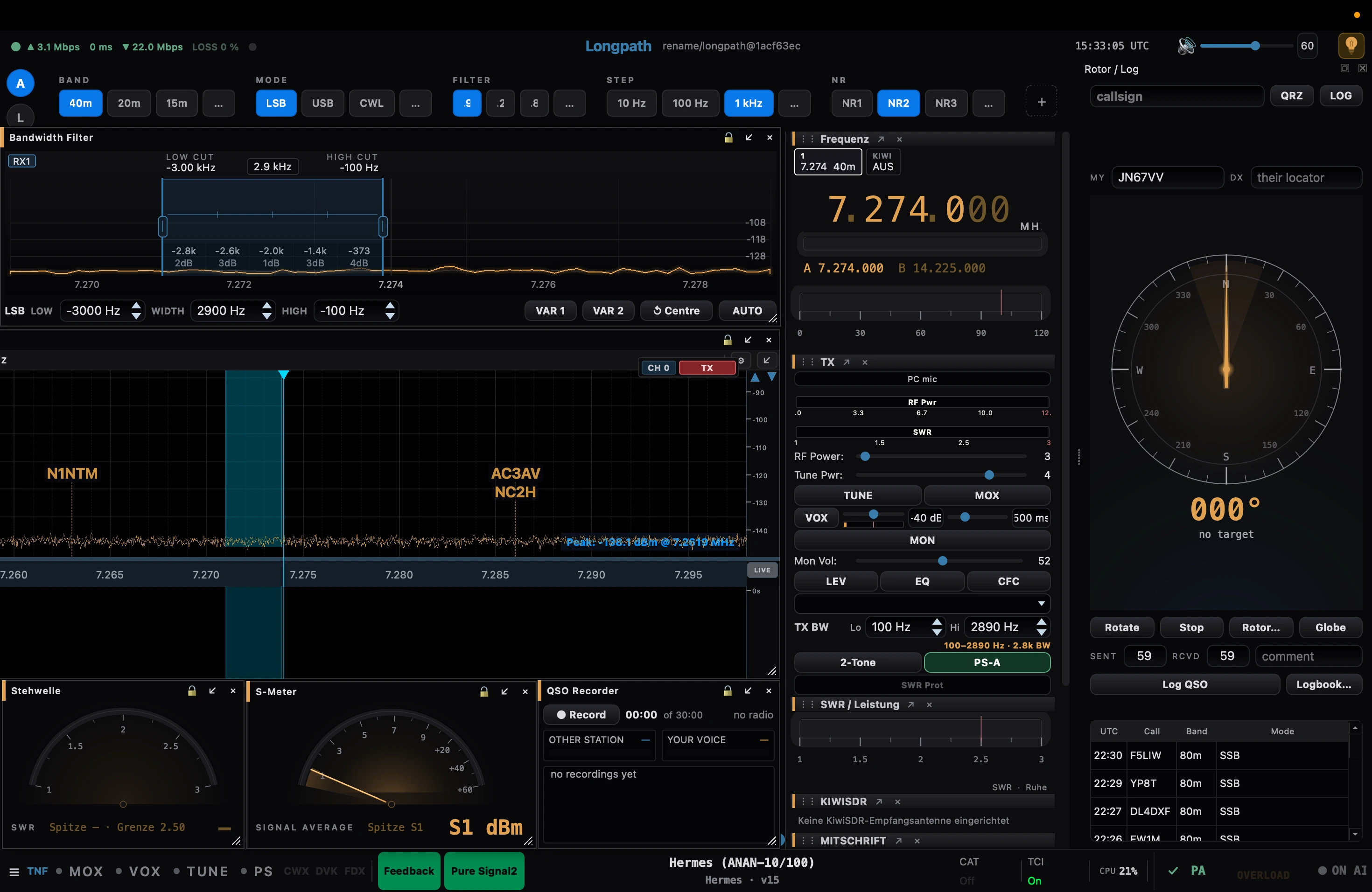
Der ganze Arbeitsplatz in einem Fenster
01 — Konsole

Der ganze Arbeitsplatz in einem Fenster

Bandbild und Wasserfall, der Durchlassbereich als eigenes Feld, Sendekette, Stehwelle, S-Meter, Rotor und Logbuch — alles dockbar, alles an derselben Stelle wiederzufinden. Hier an einem ANAN-10/100 auf 40 m.

Ein Logbuch, das sich aufklappt
02 — Logbuch

Ein Logbuch, das sich aufklappt

Aus der schmalen Leiste am Rand wird ein voller Arbeitsplatz: Verbindungen suchen, filtern, ergänzen, als ADIF oder Cabrillo hinausschreiben. Daneben die Stammdaten zum Rufzeichen und die Peilung dorthin.

Der Kanalzug sitzt vor dem Funkgerät, nicht darin
03 — Sendeton

Der Kanalzug sitzt vor dem Funkgerät, nicht darin

Gate, EQ, De-Esser, Kompressor, Röhre, Hall und Begrenzer in Signalreihenfolge — am Mikrofon, bevor WDSP es sieht. Abgeschaltet ist der Ton bitgenau der von vorher, der Vergleich also echt und nicht ungefähr.

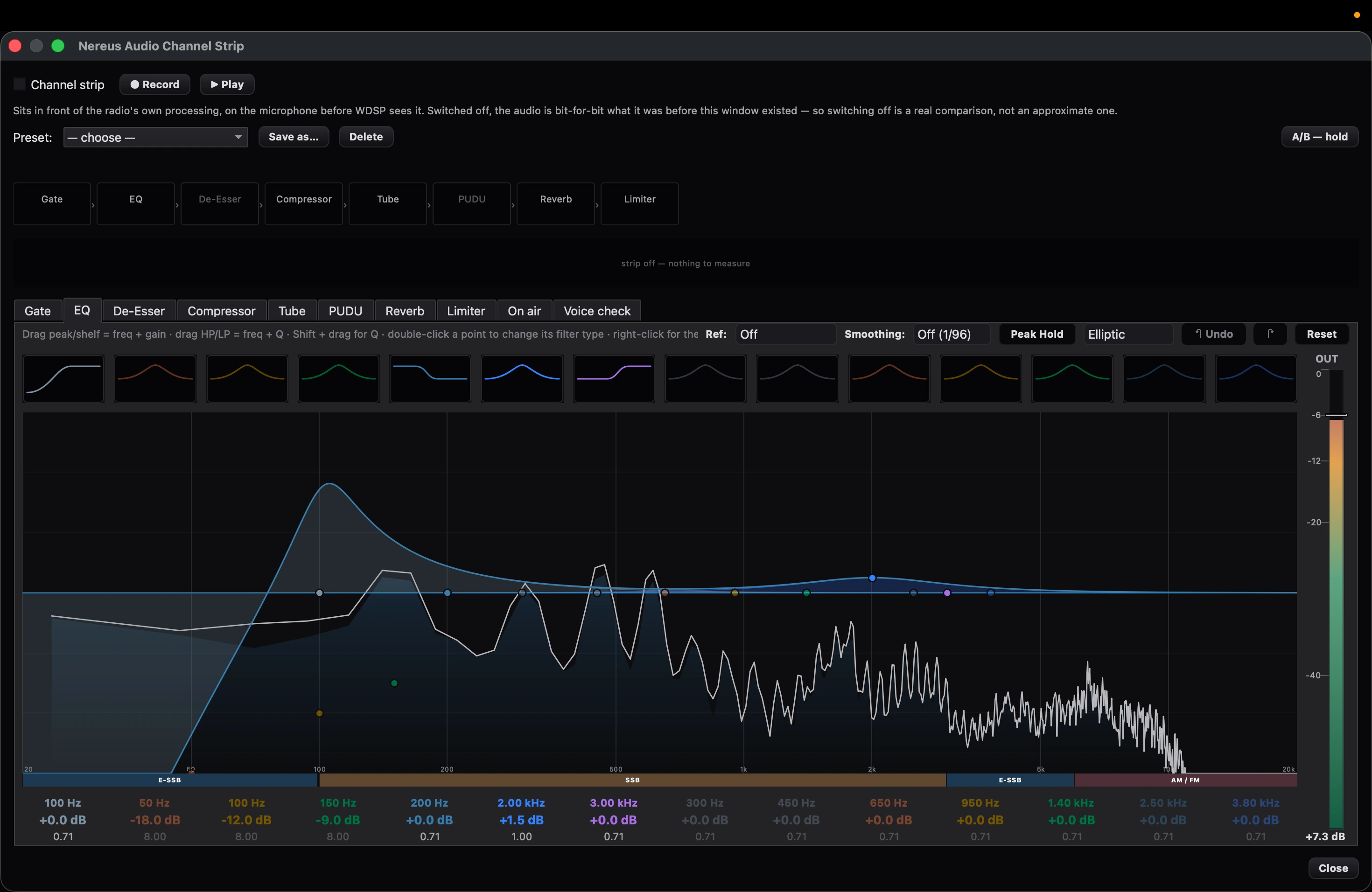
Vierzehn Bänder über dem laufenden Spektrum
04 — Entzerrer

Vierzehn Bänder über dem laufenden Spektrum

Die Kurve liegt über dem, was das Mikrofon gerade liefert. Darunter die Bandgrenzen von E-SSB, SSB und AM/FM — man sieht, wofür man einstellt, statt es zu erraten.

Recorded on a live radio

The interface in motion.

Screenshots show what it looks like. What it feels like only shows in motion: the waterfall, the callsigns drifting across the panadapter, the readouts moving along. Recorded on an ANAN-7000DLE on 20 metres.

2:30 · mit Ton

A radio that doesn't speak OpenHPSDR at all

SunSDR2 QRP — over TCI, not a board driver.

The SunSDR2 QRP doesn't speak OpenHPSDR. Expert Electronics doesn't publish its protocol, so there's no board driver to write. The only way in is TCI — the same protocol Longpath already speaks as a server, so WSJT-X and N1MM can drive it. Here it's the other way round: Longpath is the client, ExpertSDR2 the server.

That flips the roles. With every other radio, Longpath does the computing itself — the box is just an ADC at the end of a cable. ExpertSDR2 brings its own DSP chain and decides what leaves the case. Longpath can't demodulate there; it can only ask, take the result, display it and make it audible.

Audio, display and control all run through the same paths as a real receiver — the same mixer, a genuine FFT in its reserved slot, the same router onto the same panadapter. No second, parallel path that eventually drifts apart.

The way in
  1. 01 Connection — ws://host:40001
  2. 02 Audio — RX audio into the mixer
  3. 03 Display — I/Q onto the panadapter
  4. 04 Control — frequency and mode, both directions
Verified on hardware 24.08.2026 · OE5SOS

The boundary that applies here. A receiver attached to a real radio is never fed or controlled through this path — in either direction. SunSDR is a second, independent radio; if its state could leak into a receiver that belongs to a transmitter, hardware would shift under an operator who assumes only Longpath is holding it. Where caution and safety disagree, safety wins.

Current status

Verified on real hardware — ready to download.

The packages are built together and signed together. This version is verified on hardware on the Mac; Linux is built but has not been run on a device. Windows is back — to try, not verified. The package was held back from October because nobody could test it on hardware and an audio fault with the ANAN-10 stayed unexplained; it shows up as steady crackling, so it is dropouts in the output path rather than distortion. Since 22 October a Windows machine has been available to measure on, which removes the reason for holding it back. Anyone trying it should expect that crackling. Reproduced on hardware on 22 October 2026: unchanged, and equally through every driver interface (MME, WASAPI, WDM-KS, DirectSound). The speaker path is the same code on every platform, so the cause is not a Windows peculiarity of the program. Measured on these very packages: macOS 12 is now enough on Apple Silicon and Intel, Linux x86_64 runs from glibc 2.35, every package carries Qt 6.8, and serial PTT/CW is in all of them. A macOS that is too old says so instead of crashing at startup. Still open is the aarch64 AppImage: it requires glibc 2.38 and therefore will not start on Raspberry Pi OS Bookworm.

Channel · released v0.8.2 — 22 October 2026

For this device

macOS · Apple Silicon DMG · PKG · macOS 12 or later · GPG-signed Verified & signed Download (DMG) ·Download (PKG)

macOS · Intel DMG · PKG · macOS 12 or later · GPG-signed Verified & signed Download (DMG) ·Download (PKG)

Linux AppImage · x86_64 glibc 2.35+ · aarch64 2.38+ Signed · unverified Download (x86_64) ·Download (aarch64)

Windows Installer · portable ZIP · x64 · GPG-signed Signed · unverified · audio issue open Download (Installer) ·Download (ZIP)

All packages SHA256SUMS.txt · GPG-signed Verified & signed Download

First launch on the Mac. The packages carry a GPG signature but no Apple Developer ID certificate — Apple issues those only to paying members of its developer programme, and without a certificate there can be no notarisation either. macOS therefore refuses to open the app on the first double-click. Clear it once: System Settings → Privacy & Security, scroll down to the notice about Longpath, click Open Anyway and confirm with your password or Touch ID. After that it starts like any other — until the next version. Without a certificate macOS knows the app only by the checksum of that one build, so every new version counts as a different program: the release and the microphone permission have to be granted again after each update. The same route applies to the PKG. If you prefer the terminal, strip the marker from the downloaded file before opening it: xattr -d com.apple.quarantine ~/Downloads/Longpath-*. None of this changes the program — it only removes the provenance marker the browser attaches on download.

Provenance. Longpath is a fork of NereusSDR (J. J. Boyd, KG4VCF), itself a C++20/Qt6 port of Thetis — FlexRadio Systems, Doug Wigley (W5WC), Richard Samphire (MW0LGE) and the OpenHPSDR contributors. The DSP is WDSP by Warren Pratt (NR0V). Architecture and much of the code come from AetherSDR (Jeremy, KK7GWY). Every attribution notice stands unchanged in the source tree. GPLv3, as the upstream licenses require.